

- Applied Research
- Nov-24-2026
FluidOS: From Intent to a Running Interface

FluidOS explores the operating-system foundations for Agentic UI (Agentic User Interface) through cockpit theming. A short visual brief becomes a coordinated interface theme that the operating system can validate and apply.
TL;DR. We built a multimodal workbench that compiles a short visual brief into a complete theme package for FluidOS, our Android-based automotive cockpit system, covering 132 coordinated style pointsStyle points. A style point is an OS styling target, not a file. One target may require multiple state images; other targets specify colors, fonts, or video resources.. Generative models create the assets; model-based review and deterministic checks validate their suitability for the system. An Android runtime then activates the packages across native controls and graphics hosts.
“An ice-age cockpit, with mammoth fur and fractured glass.”
That concept suggests a world of materials, colors, and light. Turning it into an operating-system interface requires translating those suggestions into precise decisions: a button must stay aligned when pressed, translucent ice must composite over a moving background, and navigation colors must preserve live traffic information.
We built a generation workbench to connect expressive visual intent with these system requirements. So far, it has produced 5,000 complete theme packages for FluidOS. This post describes the failures that shaped the pipeline and the runtime support that makes its outputs usable across the system.
On target cockpit hardware, preinstalled themes took about 2.5 seconds to activate on average. In a 180-transition stress test, 179 passed all checks. One transition timed out waiting for Weather’s first frame, and no processes restarted.
On this page
System Overview: Compiling Visual Intent into a Decoupled Theme Pack
The cloud workbench creates a self-contained, cryptographically verified Theme Pack, validated in cloud preview before it reaches a vehicle. The Android runtime installs and activates the pack in the cockpit.
FluidOS keeps this cloud generation control planeControl plane and runtime. The control plane is the cloud workbench that creates and validates a pack. The runtime is the Android software that installs and activates it in the cockpit. strictly separate from the physical vehicle runtime. The workbench does not connect to physical head units or change live device state. The Theme Pack is its sole formal deliverable.
One theme pack connects workbench and cockpit
Generation compiles the pack. Android owns installation, activation, and recovery.
Workbench
Brief + references
Generate and validate
Theme Pack
Assets + mappings
Integrity checks
Android cockpit
Pre-stage locally
Activate across processes
Shared Style Point Registry
132 styling targets across six cockpit domains
The Theme Pack is the formal handoff between cloud generation and the physical vehicle runtime.
Both sides bind to a single schema-driven source of truth: the Style Point Registry, which defines 132 coordinated styling targets across six cockpit domains—SystemUI native top/bottom bars and status indicators, CarLauncher app icons and drawer surfaces, Cabin HVAC and seat control artwork, Navigation map palettes and car markers, ADASCockpit vocabulary. ADAS means advanced driver-assistance systems; HMI means human–machine interface. Here, ADAS 3D HMI names the driving display. HVAC refers to heating, ventilation, and air conditioning. 3D driving controls, and dynamic Weather wallpapers and icons. Each compiled package bundles:
- Delivery contracts: verified assets, resource bindings, and theme configuration.
- 100+ Logical Transparent UI Outputs: multi-state icons, bar widgets, status indicators, weather detail icons, HMI controls, and launcher app icons with reconstructed alpha channels.
- 5 Looping Weather Videos: ambient loops spanning five weather conditions, packaged without duplicating shared theme resourcesShared weather resources. A base theme’s five weather variants live in one pack and reuse its shared resources..
- Cabin & Driving Environment Resources: full-bleed HVAC/seat artwork, clean desktop wallpapers, and synchronized 3D driving-scene style bindings.
The End-to-End Multimodal Generation Pipeline
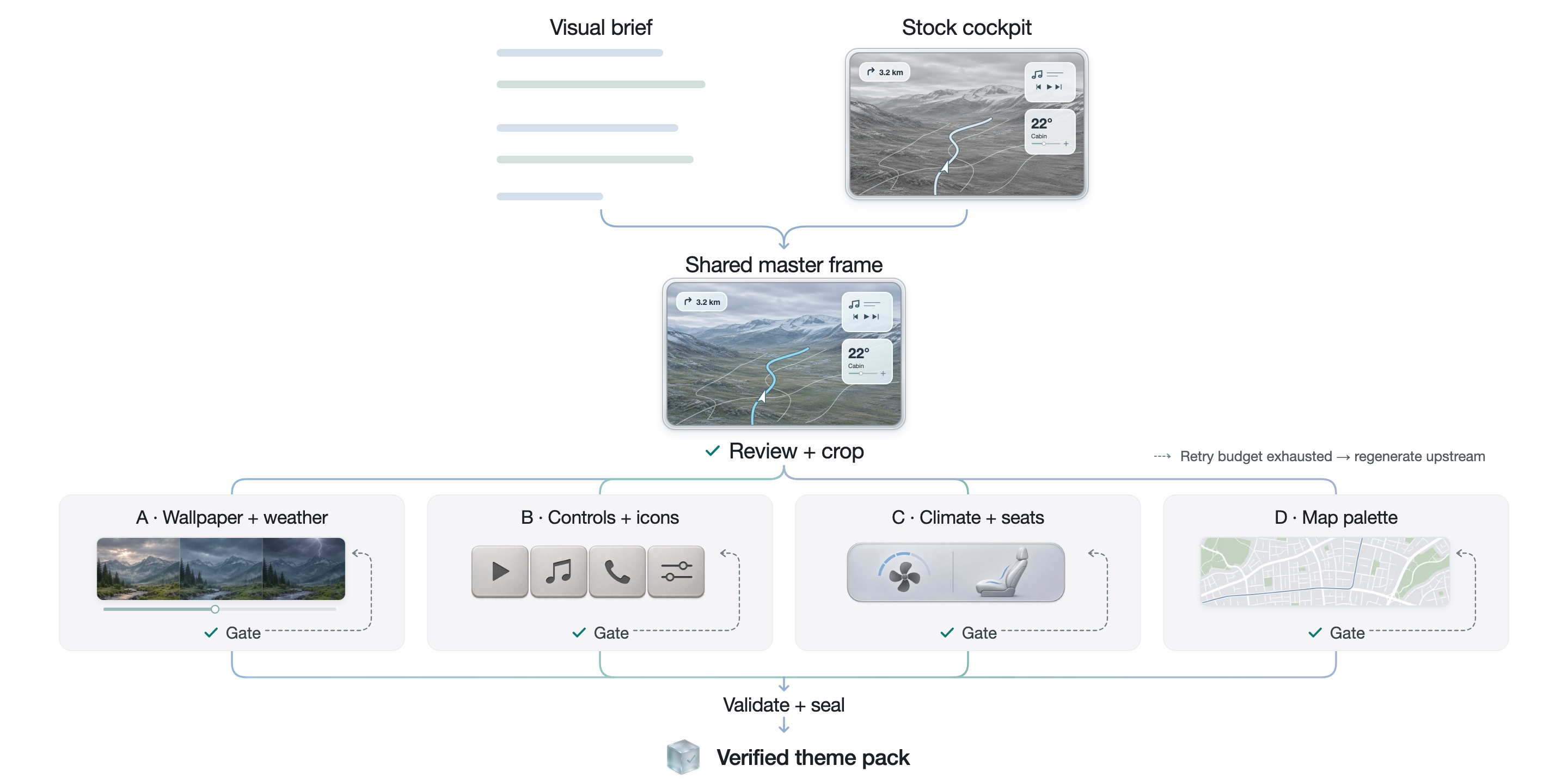
A theme must carry the same materials and lighting from a full cockpit composition into small controls, transparent edges, and moving weather scenes. These resources also have different acceptance criteria: a crop must retain source pixels, a state pair must retain geometry, and a weather clip must loop. We organize generation as a directed acyclic graph with four parallel branches, assigning specialized models and checks to each task.
A Shared Master Frame
A single visual brief has to carry through to wallpaper, controls, cabin views, and maps. We generate one shared master frame to give all four branches a common reference for materials, lighting, layout, and icon meaning. Starting from a stock cockpit screenshot, a visual brief, and optional style references, a high-resolution composition model generates a high-resolution master cockpit image while preserving layout and icon meaning. This image guides generation across bars, widgets, icons, and surfaces.Nodes and gates. Nodes are processing steps in the workbench; gates are acceptance checks between stages.
Before downstream generation begins, a fresh-context vision-language reviewer checks layout adherence, material coherence, and icon legibility. The workbench uses a fixed retry budget; exhausting it rejects the session. An accepted master is losslessly cropped to a centered target frame, which feeds the four generation branches.
Generation, validation, recovery
One visual concept coordinates the resources before validation and packaging.
Closing the Loop: Tiered Gates and Upstream Recovery
If a downstream node exhausts its retry budget, the scheduler triggers upstream recovery: it invalidates the affected branch and regenerates its source image or, if needed, the master composition. For example, when a highlight blends into an icon's outline in the master frame, cropping the same pixels again cannot recover the edge. The composition itself needs to change. When repeated validation failures point to a problem in the source, the workbench can regenerate that source and rerun the affected branch.
Validation gates sit at every critical branch boundary—combining isolated VLM reviews (zero generation history carried over) with deterministic verification (unchanged-pixel ratio, guide drift, paired geometry similarity, luminance contrast/OCR, background fidelity, and video loop closure).
Branch A: Wallpapers, System Bars, and Weather Loops
Branch A prepares wallpaper and system-bar strips for control extraction, while a parallel track generates five weather loops from the same scene. The loops must preserve the reference background and return to their opening frame without a visible seam.
One reference, two parallel resource tracks
Accepted master
Shared materials
and lighting
Wallpaper and system bars
Rebuild wallpaper
Generate an HD background
Crop bar strips
Exact source pixels
Branch B
Widget extraction
Weather
Clean scene
Remove widgets + docks
Five weather briefs
Match start and end frames
Generate loops
Shared scene reference
Verify
Background + loop closure
Branch B: Controls, Icons, and Launcher Surfaces
Branch B produces 100+ transparent UI assets across driving controls, system bars, weather, and the Launcher, using shared sheets to keep related icons visually consistent. Subpixel alignment and fragment clustering preserve disconnected pieces such as signal bars, while paired-background reconstruction recovers translucent edges.Islands and fragments. An icon can contain disconnected pieces, such as the bars of a signal glyph. Island detection finds separate pixel regions; clustering groups the pieces that belong to one icon.
Three UI families share one transparency workflow
Branch B compiles 100+ logical transparent outputs across cockpit controls and applications.
Driving and navigation
Driving buttons and map recentering
System bars and weather
Bar controls, status glyphs, and weather icons
Launcher
Application icons and drawer resources
Example icons from the Ice Age theme pack. Their original pixels are retained.
Branch C: Aligned Cabin Views and Control Colors
Branch C generates climate and seat artwork from three viewpoints under one shared guide, so materials, lighting, and geometry agree across views. It checks alignment before cropping and publishes the accepted artwork together with its control-state colors.
Shared guides align three cabin views
Shared guide sheet
Check registration
Align all three views
Crop without resizing
3 aligned views
Climate · seat top · seat side
Control-state colors
Joint visual review before publishing
Publish atomically
Artwork and colors publish together.
Branch D: Navigation Colors
Branch D derives six source-to-target color anchors in OKLab from the shared cockpit reference. They recolor the base map while preserving recognizable traffic colors in the tested map configuration.OKLab color anchors. OKLab represents colors using perceived lightness and two color axes. Each anchor pairs a source map color with its themed replacement.
Recolor the base map, preserve traffic information
Branch D compiles six source-to-theme color anchors in OKLab.
Base-map colors
Live traffic
Tang–Song Desert palette · colors outside the configured match radius pass through unchanged.
Generation methods and package contracts
Package contracts. Each pack includes per-asset digests and provenance, validated bindings between assets and styling targets, and theme configuration for colors and fonts.
Wallpaper and weather. The workbench crops the wallpaper to the target frame, previews safe window bounds, and slices top-left, top-right, and bottom-bar strips onto black canvases for widget extraction. Weather briefs use structured prompts. Automated checks verify background fidelity, clip length, and matching first and last frames.
Icon sheets. A reference strip and application icons enter one multipart generation request. Output slots map back to the reference grid, with subpixel alignment, island detection, and clustering before paired-background transparency recovery. Separate steps produce the Launcher backdrop and drawer layer.
Cabin guides. A shared guide sheet constrains the climate view, seat top view, and seat side profile. Acceptance checks guide drift and edge coverage before cropping without resizing. A shared palette covers day/night, active/inactive/disabled, and heating/cooling states. Accepted artwork and colors publish atomically, with rollback on persistence failure.
Deterministic Fidelity Guardrails Inside the Pipeline
Generative models supply visual invention, but operating-system interfaces enforce strict pixel, alpha, geometry, and semantic invariants. Rather than leaving those invariants to prompt engineering, FluidOS embeds four deterministic and hybrid guardrails directly inside the compilation DAG.
Coordinate-Only Localization and Source-Pixel Preservation
Asking an image model to return an isolated icon directly causes subtle redrawing—thin strokes soften, reflections shift, and details vanish. We therefore use the model to locate the icon and deterministic cropping to extract it. The model draws thin, pure-red bounding boxes over the target region; a deterministic gate compares pixels outside the red marks with the original frame. We discard the annotated image and export only its bounding-box coordinates. The final crop reads losslessly from the untouched master.
Keep the source pixels. Export the coordinates.
Direct icon output can soften thin strokes and shift highlights. The model returns bounds; cropping reads untouched source pixels.
Pause animationResume animation
Animation paused. The full diagram remains visible.
Locate the region
Thin red bounds; source pixels stay intact.
Verify the annotation
Pixel check
Compare pixels outside the red marks
Export [x₁, y₁, x₂, y₂]. Discard the annotated image.
Crop the untouched source
Same pixels, enlarged here for inspection.
The red bounds provide coordinates. The exported crop is read from the original image, not the annotation.
Dual-Background Alpha Reconstruction
Frost, fur, and faint glows have partially transparent edges that can carry a trace of their original background into a new scene. We recover opacity and foreground color from paired black- and white-background observations, using alignment and filtering that preserve the asset’s geometry.
Recover transparent edges, then composite across scenes
Paired black–white reconstruction serves 100+ logical transparent outputs.
Work at higher resolution
Protect thin frost and fur detail.
Align the observations
Correct position without changing shape.
Recover opacity + color
Separate the asset from its background.
Filter transparent edges
Resize in premultiplied-alpha space.
Recovered Ice Age RGBA assets · the same icons over four backgrounds
RGBA over black
RGBA over white
RGBA over checkerboard
RGBA over a warm scene
Alpha reconstruction methods and equations
Under the alpha-compositing model I = αF + (1 − α)B, the black–white difference equals 1 − α. This gives an opacity estimate when the foreground is consistent between observations.Alpha and the equation. Alpha (α) is opacity: 0 is transparent and 1 is opaque. F is foreground color, B is background color, and I is the observed image.
α̂ = clip(1 − meanRGB(Iwhite − Iblack), 0, 1)
F̂ = Iblack / α̂ (α̂ > 0)
Reconstruction compares the two observations pixel by pixel, so small positional shifts must be corrected first. We align the white-background image to the black observation using subpixel 2D translation. This corrects positional drift without reshaping the icon. Translation cannot restore fur strands or highlights redrawn between the two observations.
For small icons, we reconstruct opacity and foreground color on supersampled working canvases, then downsample in premultiplied-alpha spacePremultiplied alpha. RGB values are multiplied by opacity before filtering. Nearly transparent pixels then contribute proportionally less color when an icon is resized. to preserve translucent edges over changing cockpit backgrounds.
Multi-State Geometric Consistency and Readability
Two button states can look correct separately yet move, grow, or change silhouette when alternated. We evaluate them together: fresh-context visual review checks whether the states make sense, and a structural comparison removes the global color shift to check geometric consistency.
Evaluate states together, not in isolation
Fresh-context review and paired structural comparison examine different properties of a state pair.
Aligned geometry
Drift → retry / backtrack
The lower pair illustrates drift.
Structural check
Remove global mean color shift, then compare paired geometry.
Fresh-context visual review
Pass/fail decision with reasoning, without the generation conversation.
Readability
Contrast + OCR over the target background: labels, clocks, music titles, and HVAC text.
Crosshairs hold the reference position fixed. The drift example exaggerates displacement to make it visible.
State-check calibration
The structural check uses calibrated acceptance tiers for multi-state icon groups. It removes the global mean color shift before comparing silhouettes and centroids.
Each fresh-context reviewer returns a pass/fail decision with reasoning. Labels, clocks, music titles, and climate-control text undergo luminance-contrast and OCR checks over their target backgrounds.
Perceptual Map Color Anchors and Live Traffic Boundaries
A theme may change the base map’s appearance, but traffic colors carry information that must remain recognizable. We constrain recoloring to neighborhoods around the base-map anchors, preserving traffic colors outside those neighborhoods in the tested map configuration.
Map-color interpolation methods
As shown in Figure 6, the map-palette pipeline generates six lightness-ordered source-to-target color anchors in OKLab. The navigation shader applies a narrow inverse-fourth-power distance weighting kernel. Reference: OKLab.
wi(c) =1 / max(‖c − si‖4, ε)coverage(c) =1 − smoothstep(rinner, r, mini ‖c − si‖)
Here, c is the input map color, si is source anchor i, and r is the matching radius. The inner radius marks the start of the falloff; ε prevents division by zero. The fourth-power decay keeps light-map base and building anchors—which can differ by a single RGB step—from averaging into one another while interpolating smoothly along anti-aliased edges. A pixel whose nearest base-map anchor lies outside the matching radius passes through unchanged, preserving traffic colors within the tested map configuration.
Android Automotive Runtime Architecture: Zero-Restart Multi-Process Activation
A running cockpit contains native Android controls alongside navigation and a live 3D driving view. Applying a theme must coordinate their resources while keeping the driving and navigation engines alive.
Prepare Packs Before Activation
Transferring files, unpacking archives, and compiling overlays during a switch would put preparation work in the user’s waiting time. We complete that work in advance, so activation reuses resources already installed on the device.
Prepare resources before activation
Before activation
Choose the pack
Read the release manifest.
Cache locally
Reuse an installed package.
Verify and install
Make assets ready on the device.
Prepare overlays
Compile before the switch.
During activation
Reuse prepared resources
No transfer, unpacking, or compilation
Two Delivery Paths for Cockpit Resources
Android resource overlays can recreate the screen that consumes themActivity recreation. An Activity is an Android component that hosts a user-facing screen. Recreating it rebuilds that screen and its UI objects; it differs from restarting the entire app process.. That reload works well for lightweight system controls. A live Unity driving view or OpenGL ES navigation map needs to keep its rendering context alive, so these hosts follow a different path. Native controls use overlays; graphics and media hosts replace resources in place and confirm their first presented frame.
Two paths for native and graphics resources
Device Agent
Coordinates both delivery paths
Path A Native overlays
System bars, settings, weather icons
Commit overlays
Apply prepared replacements to native controls.
Reload resources
Native screens consume the new appearance.
Path B Dynamic hosts
Navigation, 3D driving, Launcher, wallpaper
Replace resources in place
Keep Unity and OpenGL ES contexts alive.
Confirm the first frame
Hosts acknowledge the new presentation.
Cross-Process Transactions, Journaling, and Crash Recovery
The two delivery paths do not share one Android transaction coordinator, so the Device Agent journals progress and rejects stale work. If activation fails, it compensates completed steps in reverse order; startup recovery repairs work interrupted by a crash or power loss.
System Evaluation and Runtime Hardening
We tested activation on target cockpit hardware under repeated switching.
Final Device Stress Test
We tested preinstalled themes through repeated cross-theme switches and restores of the stock system. Figure 12 summarizes activation and check outcomes.
180 transitions on target cockpit hardware
Activation and full-chain checks for preinstalled themes.
179 passed all checks
1 Weather first-frame timeout
- Average activation
- About 2.5 seconds
- Process restarts
- None observed
Stress-test protocol
On target cockpit hardware, we ran 30 consecutive rounds with six transitions per round: 60 stock-system restores and 120 cross-theme switches, totaling 180 transitions.
We manually inspected the on-device screenshot from every transition and found no visual defects.
Method and Runtime Constraints
- Paired observations: Black–white alpha recovery requires consistent foreground geometry and color handling. Translation corrects positional jitter; redrawn fur strands or shifted highlights change the foreground itself. At very low opacity, small color errors have a larger effect on the recovered foreground.
- Runtime workload and map configuration: Hardware state, concurrent navigation/ADAS work, and media-decoder contention affect switching latency. Navigation traffic-color preservation depends on the base-map palette and the matching radius; a new map style requires anchor recalibration and boundary checks.
Toward Fluid Semantics
In this work, we tested how far a cockpit interface can change its appearance while preserving interaction state and keeping navigation and driving processes running. The next step for Agentic UI is to study how the interface can also choose and arrange what it shows around the user’s task, while keeping essential vehicle controls in familiar places.
In FluidOS, a short visual brief becomes coordinated resources through a multi-model DAG, semantic and geometric checks, and a verified Theme Pack. The runtime combines an atomic native-overlay commit with in-place resource changes across multiple Android processes, keeping the driving and navigation engines running. Our ongoing work extends this approach to component choice, spatial hierarchy, and context-adaptive behavior.
Imagine a driver saying, “Find a charging stop where I can get coffee.” The agent could compare stops and show charging availability, nearby cafés, and detour time together. The driver could ask for a shorter detour or choose a stop. Once the driver confirms, the interface could update the route while keeping essential vehicle controls in familiar places. The driver’s intent and ongoing feedback would shape which components appear and how they are arranged, extending the approach from coordinated visual themes to task-driven interfaces.
Citation
Please cite this work as:
Xue Zizhen, Liew Wei Jun, Khong Ming Liang, and Gong Yichen. (2026). FluidOS: From Intent to a Running Interface. Acrab AI Research Blog.
https://www.acrab.ai/research/fluidos
Or use the BibTeX citation:
@misc{xue2026fluidos,
  author       = {{Xue Zizhen} and Liew, Wei Jun and Khong, Ming Liang and {Gong Yichen}},
  title        = {{FluidOS}: From Intent to a Running Interface},
  year         = {2026},
  organization = {Agentic Labs, Acrab AI},
  howpublished = {Acrab AI Research Blog},
  url          = {https://www.acrab.ai/research/fluidos}
}
Continue the conversation. Follow @Acrab_Ai on X for news from the team. We welcome questions and technical discussion about generated interfaces, asset validation, and fluid semantics.